
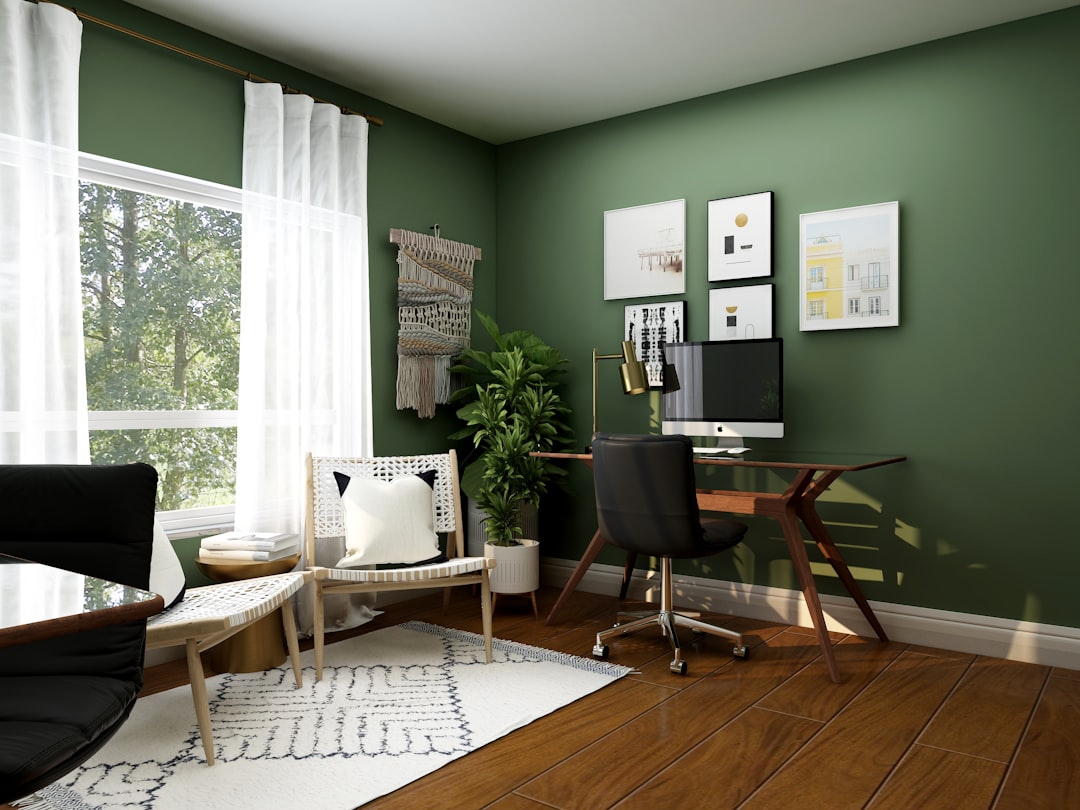
Good home office design is less about a stylish desk and more about removing friction from the hours you spend working. The best home workspaces let you sit down, focus and stand up at the end of the day without aches, glare or clutter pulling at your attention. That outcome comes from a handful of deliberate decisions about where the office lives, how you sit, how it is lit and how cables and noise are handled.
Whether you have a dedicated room or a corner of a bedroom, the same principles apply at different scales. This guide works through location and zoning, ergonomics, lighting, storage, acoustics and video-call presentation, then closes with the mistakes that quietly undermine an otherwise good room. The aim is a workspace that feels separate from home life even when it shares a wall with it.
Location and zoning
Choose the location before the furniture. The ideal home office sits away from the busiest household traffic, near a window for daylight, and ideally behind a door you can close. If a spare room is available, it usually wins; if not, look for a corner that can be psychologically separated from the rest of the room rather than a desk floating in the middle of the living space.
Zoning is what makes a shared room work. A change in flooring, a rug, a low shelf or even a different paint colour signals where work begins and home ends, helping you start and stop the day cleanly. Position the desk so your back is not to the door if you can manage it, and so the screen does not face a bright window directly. Thinking about these boundaries early is part of any considered interior design brief rather than an afterthought.
Desk and ergonomics
Ergonomics is the foundation of home office design because it determines whether you can work pain-free for years. Set the desk so your forearms rest roughly parallel to the floor when typing, with elbows at about 90 degrees. The top of the screen should sit at or just below eye level, an arm’s length away, so your neck stays neutral rather than tilted down.
Chair and sit-stand options
Invest in the chair before almost anything else. Look for adjustable seat height, depth and lumbar support, and a seat that lets your feet rest flat with a small gap behind the knees. A sit-stand desk adds genuine value if you will actually use it; alternate posture through the day rather than choosing one fixed height. If a sit-stand desk is out of scope, a footrest and a separate keyboard and monitor still transform comfort on a fixed desk.
Lighting for work
Lighting in a home office has two jobs: provide enough light to work and avoid throwing glare or reflections onto the screen. Daylight is the best ambient source, so place the desk perpendicular to the window rather than facing it or backing onto it. Facing the window leaves you squinting; backing onto it turns the screen into a mirror.
Task light and glare control
Add a dedicated task lamp positioned to the side opposite your writing hand, so it lights the desk without casting hand shadows. Choose a warm-neutral colour temperature and, if possible, a dimmable fitting so the room balances against changing daylight. Manage screen glare with blinds or sheer curtains, an anti-glare matte monitor, and a position that keeps overhead lights and windows out of the screen’s reflection. A bright screen in a dark room strains the eyes, so keep some ambient light around it even at night.
Storage and cable management
Storage keeps the desk clear, and a clear desk keeps the mind clear. Plan storage close to where things are used: frequently handled items in a drawer at the desk, archives on higher or further shelves. Closed storage hides visual noise, while a single open shelf can hold the few things you genuinely want to see. Resist the urge to fill every surface; the empty space is what makes the room feel calm.
Taming the cables
- Route power to the desk with a socket at or above desk height, or a grommet, so cables do not climb up from the skirting.
- Mount a cable tray or basket under the desktop to collect adaptors and slack.
- Use a single switched extension for the whole desk so you can power everything down at once.
- Label and bundle cables with reusable ties so changes later are painless.
If you are running new sockets or data points into walls during a renovation, plan them precisely against where the desk will sit, and fold the cost into your overall renovation cost in Singapore so it is not a last-minute addition.
Acoustics and video-call presentation
Sound shapes how a room feels to work in and how you come across on calls. Hard, bare rooms echo, which tires the ear and muddies your microphone. Soften the space with a rug, curtains, an upholstered chair or fabric panels; even a bookshelf full of books diffuses sound usefully. A door that closes does more for concentration than any gadget.
The video-call backdrop
Plan what sits behind you on camera. Aim for a tidy, layered backdrop with a little depth rather than a flat blank wall or a chaotic shelf. Light your face from the front, near the camera, so you are not silhouetted by a window behind you. A small lamp or the daylight from a side window at the right height usually reads better than relying on overhead lighting alone.
Small-space and nook offices
Not every home offers a spare room, and a well-planned nook can outperform a poorly placed dedicated office. A shallow desk built into an alcove, a fold-down shelf, or a slim console against a wall all create a working position without dominating the room. Borrowing an under-stair recess or the end of a hallway can yield a surprisingly usable workspace.
In tight spaces, vertical storage and a closing element matter most. Shelves above the desk reclaim the footprint a cabinet would take, and a curtain, screen or cabinet door that hides the desk at the end of the day restores the room to its primary use. If the nook involves altering a recess, opening a wall or building into structure, check what is feasible first; understanding load-bearing walls early avoids costly rework, and our structural engineering consultancy can confirm what your layout allows.
Common mistakes to avoid
- Facing or backing the desk onto a window, creating glare or a silhouetted screen.
- Buying the desk before the chair, when the chair protects your body for years.
- Setting the monitor too low, which pulls the neck down into a chronic ache.
- Ignoring cables, so a tidy desk is undermined by a tangle beneath it.
- Leaving the room acoustically bare, making it echo on every call.
- Placing the office in the busiest part of the home with no way to close it off.
Frequently asked questions
How high should my monitor be?
Set the top of the screen at or just below eye level, about an arm’s length away, so your neck stays neutral rather than tilted downward through the day.
Where should a desk go relative to a window?
Place the desk perpendicular to the window so daylight falls across it, avoiding the glare of facing the window and the silhouette of backing onto it.
What is the most important purchase for a home office?
A properly adjustable chair, since it protects your posture and comfort over the long hours that other furnishings cannot influence.
How do I look better on video calls?
Light your face from near the camera, keep windows out from behind you, and arrange a tidy backdrop with some depth rather than a flat wall.
Can a small nook work as a real office?
Yes, a shallow built-in desk in an alcove or hallway with vertical storage and a way to close it off often works better than a desk poorly placed in a larger room.
Related reading
- Types of Curtains and Drapes: A Buyer’s Guide
- Curtains vs Blinds: Which to Choose for Your Home
- Color Psychology in Interior Design: A Practical Guide
- Best Bedroom Paint Colors: A Calming Buyer’s Guide
Planning a workspace that has to fit your home and your structure? Talk to our consultancy or get in touch.


